
 https://doi.org/10.46430/phen0132
Contents
- Introduction
- What is Wikidata?
- The Structure of Wikidata
- Creating a Wikidata Account and Adding an item
- Describing Academic Journal Data in Wikidata
- Describing People in Wikidata
- Tools Suggested for Item Description in Wikidata
- Conclusions
- Endnotes
Introduction
You have probably already heard about metadata, open data, and linked open data. As one of the largest freely accessible knowledge bases in the world, Wikidata is a central hub for structured, multilingual data that powers diverse applications. Its open infrastructure and community-driven model make it an ideal entry point for understanding how linked open data works in practice. This lesson will teach you how to enhance linked data on Wikidata. However, before starting, it’s important to clarify and deepen our understanding of these concepts and briefly explore their interconnections.
Lesson Background
The prefix ‘meta’ is derived from the Greek language, in which it means ‘after’ or ‘beyond.’ It is used to indicate that a concept applies to itself. ‘Metadata’, therefore, refers to ‘data about the data,’ in the sense that it describes, identifies, locates, or facilitates the understanding of the data. In the interdisciplinary field of information science, in particular, metadata provides context and structure, allowing for the efficient management, search, and organization of information. It also facilitates system interoperability1, different platforms, and the long-term preservation of digital resources. With the internet, metadata became particularly useful due to the enormous amount of information available online, as it is essential to facilitate web page classification, optimize search engines, and improve user navigation.2 3 4
In an increasingly digital and interconnected world, interest in open data has grown significantly as a response to the need of promoting transparency and data reuse across various disciplines. Metadata availability has been growing, while taking into consideration the necessary technical and legal frameworks to make it free, reusable and accessible for anyone, at any time and in any place.5 The adoption of open standards for metadata not only facilitates the understanding and exchange of data, but also drives innovation by promoting more effective communication. In this context, open data has become an essential component for building sustainable and accessible data infrastructures, promoting a collaborative approach to information management in the digital era.
In the context of open data philosophy, Linked Open Data (LOD) has emerged as a concept for presenting and publishing data on the web, aiming at facilitating data use and reuse through automated processes. LOD is based on the principle of establishing meaningful links between data with similar attributes from various sources on the web. It implies the creation of an environment with global interoperability.6 Therefore, this term refers to a set of best practices for publishing and connecting structured data on the web. Information in Wikidata is stored in semantic triples following the Resource Description Framework (RDF), which are conventionally known as subject, predicate, and object. If you would like to deepen your knowledge on this topic, you can consult more details in Jonathan Blaney’s lesson, Introduction to the Principles of Linked Open Data, which offers a brief and concise introduction to linked open data.
This lesson shows you how to create, edit, and publish LOD in a simple and cost-free way using Wikidata. You will learn about the structure of Wikidata and the procedures for creating, editing, and publishing LOD related to entities in academia such as scientific journals and researchers. This lesson is primarily aimed at librarians, archivists, and other information professionals working in academic contexts who wish to increase the visibility of the knowledge produced at their institution.
Lesson Goals
By the end of this lesson, you will:
- Understand the concepts of metadata and Linked Open Data
- Examine the process of creating, editing, and publishing open data in Wikidata
- Apply the procedures for creating, editing, and publishing open data about academic journals and people in Wikidata
- Explore the ethical considerations related to representing people through open data in Wikidata
Prerequisites
This lesson is designed to introduce beginners to Wikidata. If concepts are not familiar to you, please consult the Wikidata Training Modules for more information.
What is Wikidata?
Wikidata is a free and open platform that is entirely built with Linked Open Data (LOD). Launched in October 2012 by the Wikimedia Foundation, this database represents one of the most innovative projects for centralizing data across diverse topics and communities (Figure 1).
The Wikimedia Foundation is a nonprofit organization that provides free information and knowledge. Projects under the Wikimedia Foundation umbrella are organized into four categories: content projects, multilingual content projects, outreach and administration projects, and technical and development projects.
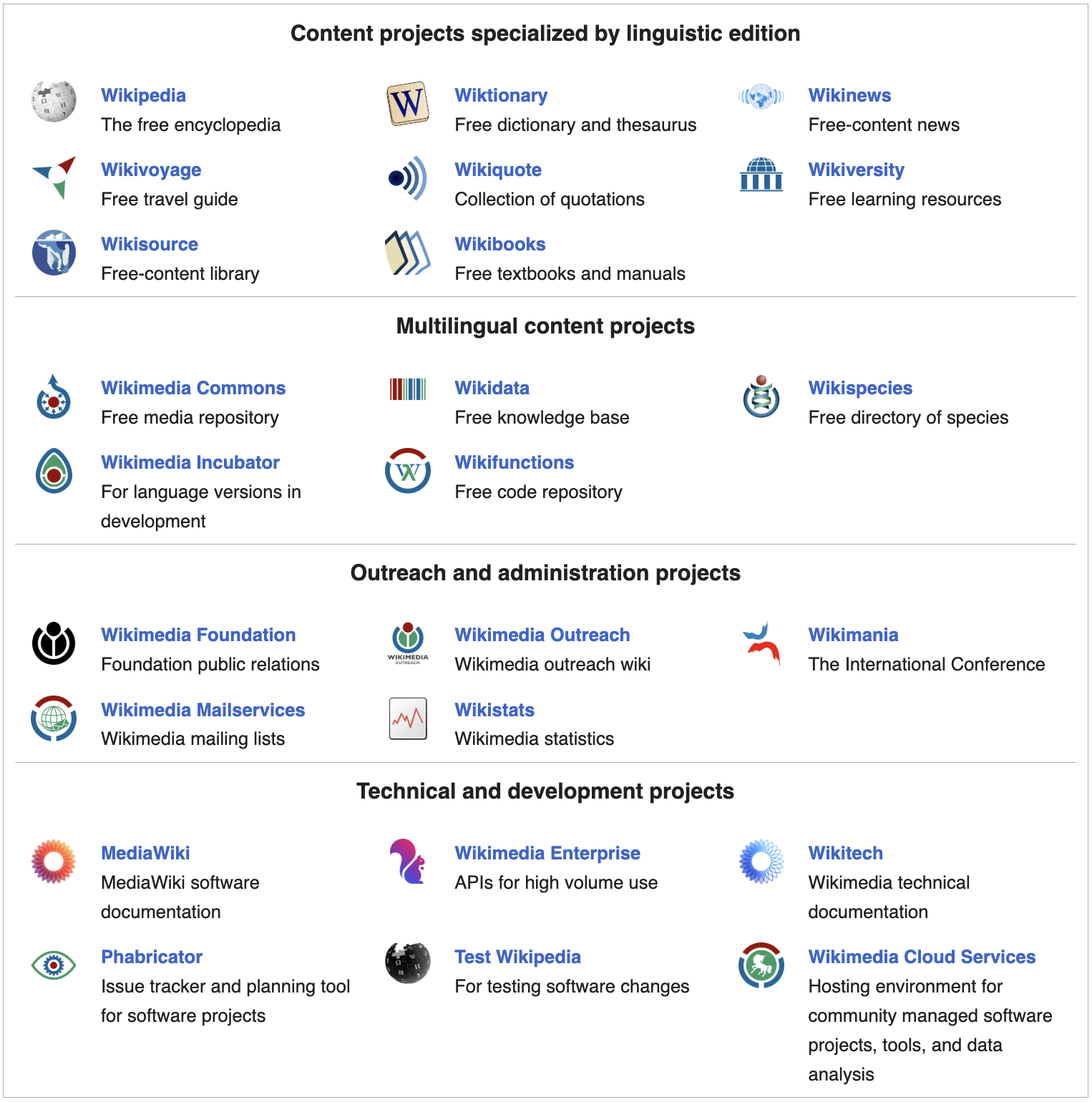
Figure 1. An overview of the Wikimedia Foundation’s projects.
According to its own website, both the content and structure of Wikidata are in the public domain. This allows users to freely copy, modify, distribute, and present the data for any purpose, including commercial use, without seeking permission.
Wikidata is also:
-
Accessible to other projects: The data stored in Wikidata is available for use by other Wikimedia projects, such as Wikipedia. This creates a centralized source of information that can be leveraged by various applications and websites.
-
Collaborative: Content creation and editing in Wikidata is enriched by contributions from volunteer users around the world.
-
Continuously updated: The community actively contributes to the improvement and expansion of the database. This helps ensure that the information is current, reflecting recent changes and discoveries.
-
Version-history compliant: Wikidata keeps a revision history for each item and statement, allowing changes to be tracked over time. This ensures transparency and the ability to revert edits if necessary. Additionally, it enables historical analysis of changing conceptions of the world as represented in Wikidata.
-
Multilingual: It supports the representation of items and their descriptions in over 300 languages.
-
Stored as structured data: All information is organized into specific fields and categories (following a model with a set of rules and constraints). This improves consistency and makes it easier for both humans and machines to search for, access, retrieve, update, and reuse the data. Wikidata organizes information using the Wikibase data model, in which knowledge is represented through semantic triples7 (conventionally known as subject, predicate, and object). This data can be exported as RDF (Resource Description Framework) and queried via the SPARQL (SPARQL Protocol and RDF Query Language) endpoint, making SPARQL a particularly valuable language for scholars wishing to extract and analyze Wikidata at scale.8
In 2019, Wikidata had approximately 60 million created items. Four years later, it had surpassed 100 million items (Figure 2), covering a wide range of topics such as objects, people, places, reports, art, buildings of cultural interest, animals, and much more.
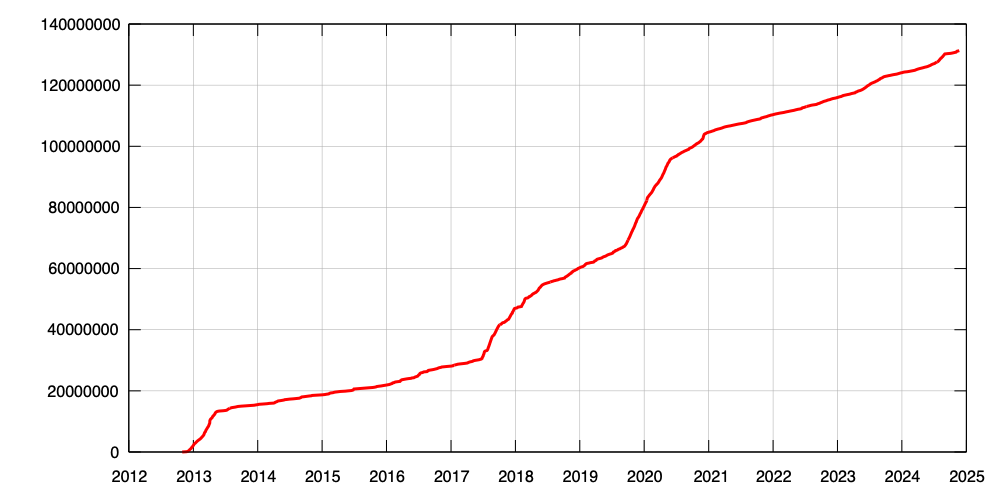
Figure 2. Item creation over time in Wikidata.
Wikidata offers a wide variety of tools to edit, query, and visualize its data. It follows a semantic web model, in which data is structured and linked in ways that machines can interpret and reason over. This model helps advance social justice, as it enables small communities that are often outside the mainstream of science to access, apply, and generate open knowledge and consequently have a broader impact. Obregón Sierra, for example, used Wikidata to include information about libraries in Spain so that they could be accessed by anyone, anywhere in the world. Initially, Wikidata contained only 303 Spanish library entries but after importing the Spanish government’s library dataset, the author created 7,861 new entries and enhanced 206 existing ones. This addition elevated Spain from 13th place (2,424 GLAM items) in 20209, to second place in global GLAM rankings in 2023.1011
Since Wikidata can connect local metadata with global data, many institutions with digital collections have begun working with it to increase their global reach. Wikidata identifiers have enabled libraries to enrich their own records. The Library of Congress’s Program for Cooperative Cataloging pilot project demonstrates the significant potential of integrating Wikidata into library workflows and collections.
The Structure of Wikidata
In this section, we will explore the organization of Wikidata, examining its components and understanding their specific functions. Through this analysis, we will strengthen our understanding of Wikidata’s hierarchical and modular structure.
‘Items’ are the fundamental units of Wikidata. They represent unique concepts, which can cover a wide range of entities, such as people, places, events, ideas, celestial bodies, living species, films, literary works, and more.
Each Wikidata item consists of a label, which is a short descriptive name used to identify the concept, appended to a unique identifier formatted as the letter Q followed by a number. For example, the Programming Historian has the identifier Q50817399 (Figure 3). This unique designation allows for easy referencing and access to a specific item, regardless of the language in which it is described. It is not necessary to memorize each item’s Q-number.
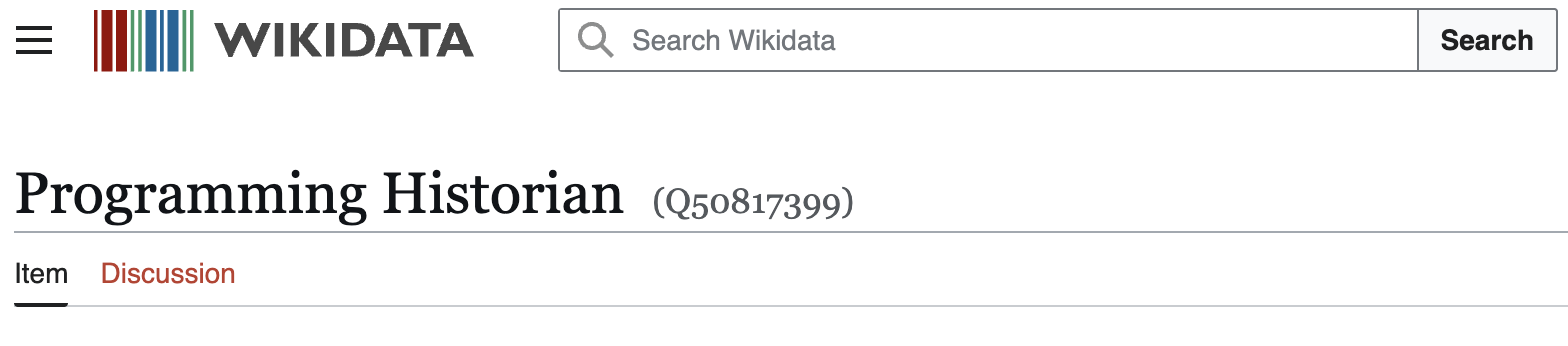
Figure 3. Example of a Wikidata identifier: the Q number for the journal ‘Programming Historian’.
Labels in Wikidata can be ambiguous. For instance, ‘San Martín’ could refer to a person, a city, an island, or a region in Peru. Identifiers, however, are universally applicable and eliminate the need for language-specific identifiers. This feature enhances machine readability and enables bots to efficiently edit Wikidata.
Following the label and identifier, each item includes a short description, which provides additional details to help distinguish it from other potentially similar items. This description is key to understanding the item’s context.
Items may also include aliases, which are alternative names or nicknames. These help make items easier to find and recognizable by different communities (Figure 4).
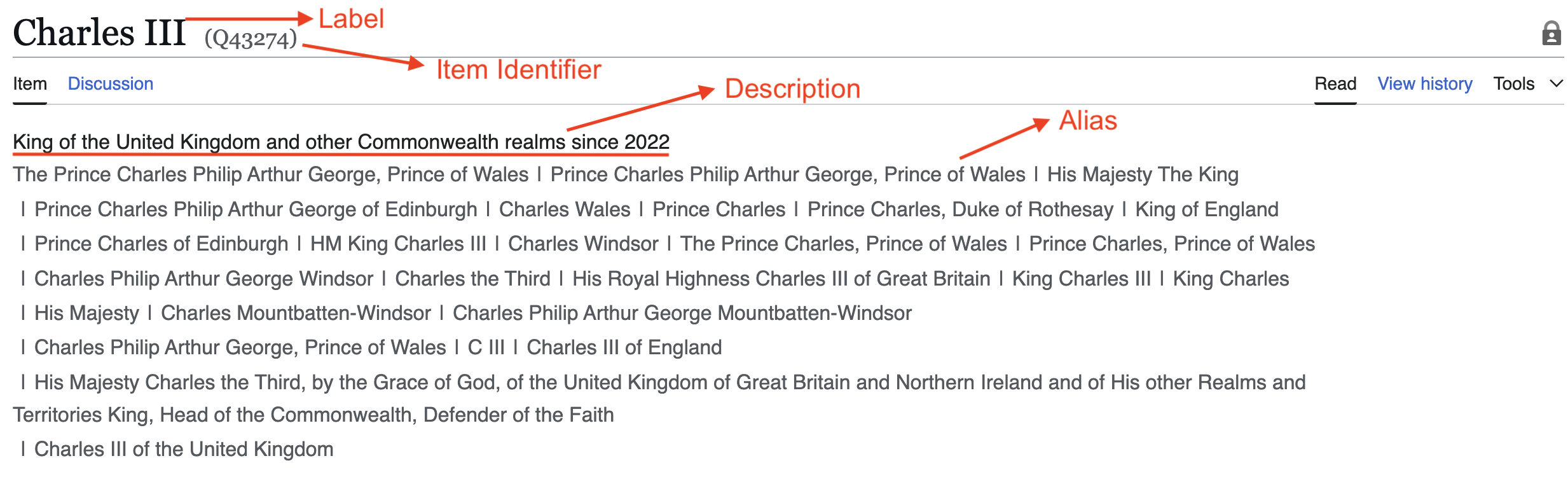
Figure 4. Example of a label, identifier, description, and name variants (aliases) in Wikidata.
After this initial section (which includes the label, Q-identifier, description, and aliases), we find the languages section, which increases the accessibility and usefulness of the information by providing translations of the items into several languages. Figure 5 shows the example of the item ‘rain’ in Wikidata, along with its translations in Spanish and Chinese. This multilingual section makes information more accessible and useful to a global audience by enabling understanding across languages.
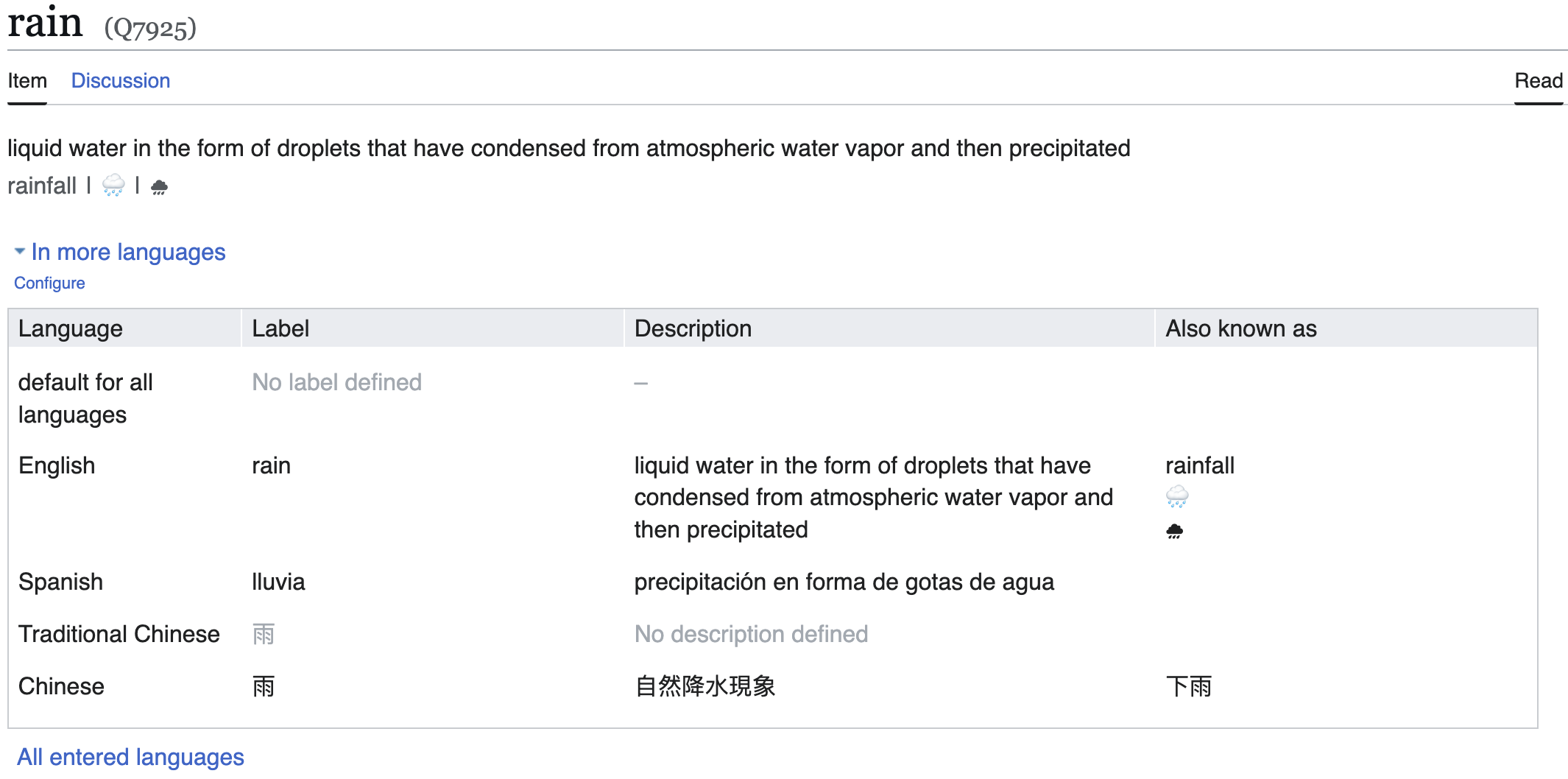
Figure 5. Example of multilingualism in Wikidata: the case of the item ‘rain’.
Wikidata describes items through statements; structured assertions that capture specific information about entities in the database. Each statement consists of a property (an attribute or characteristic) paired with a corresponding value, creating connections between different items (Figure 6). This system of interconnected statements forms the foundation of Wikidata’s hierarchical and modular architecture, establishing the relationships that define how knowledge is organized within the platform.
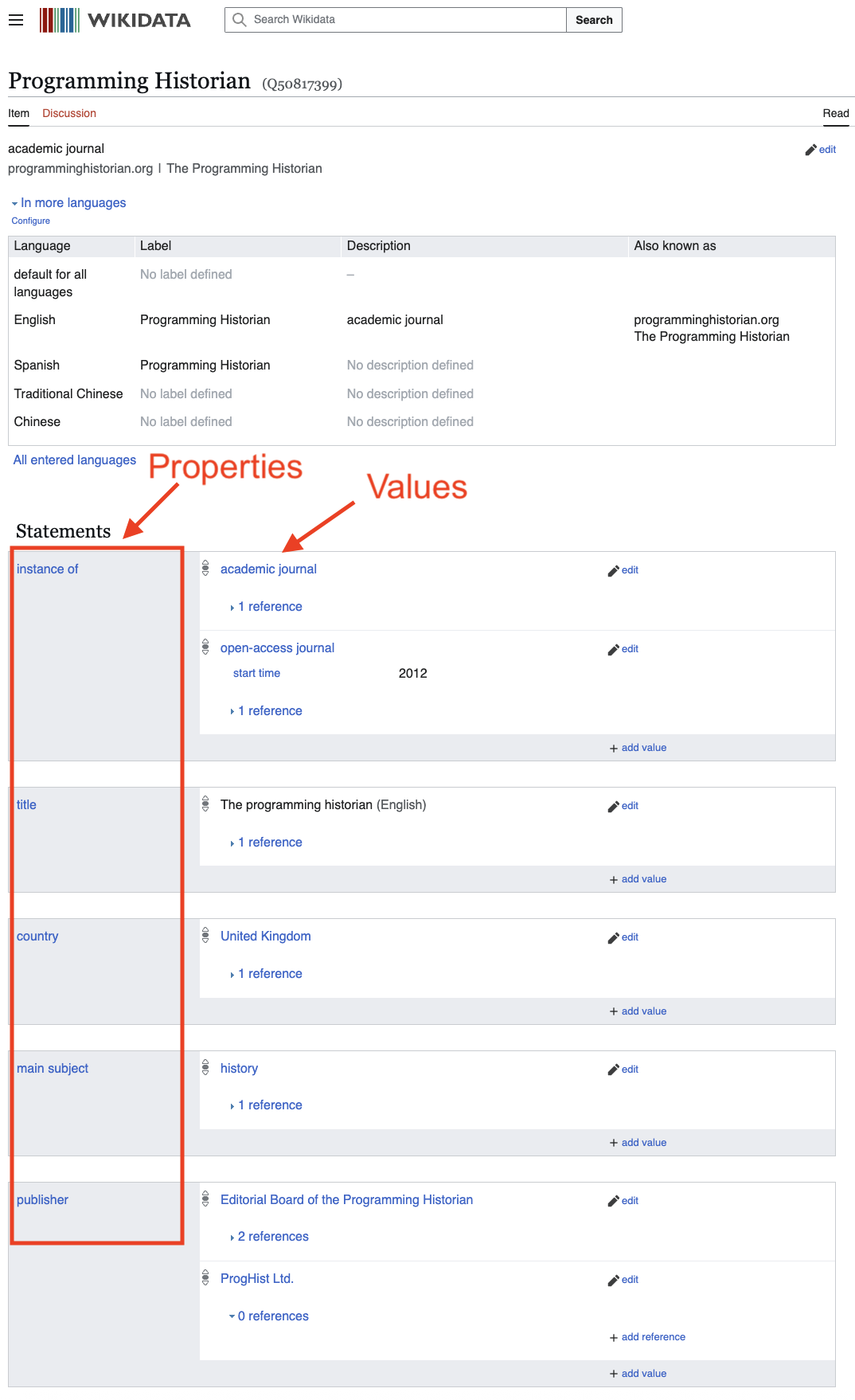
Figure 6. Statements in Wikidata: examples of properties and values.
Each property has a unique identifier in Wikidata, formatted as the letter P followed by a number. Properties in Wikidata are designed to be reusable across different contexts. This means a property can be applied to multiple item types and is not limited to a single use. For instance, the property author (P50) will be present in items that represent books, articles, plays, or any other form of written work. Each property has its own documentation page in Wikidata, providing detailed information about its purpose, proper use, and examples. See the full list of properties for more examples.
Values, on the other hand, represent the specific information associated with properties used to describe items in the database. Values can take many forms, including text, numbers, dates, links to other Wikidata items, geographic coordinates, or media files, among others. Values must conform to the constraints defined by the data type of the property they’re associated with. For instance, if a property has the data type ‘date’, then the value assigned to that property must be a valid date.
Furthermore, values in Wikidata are open to being edited by any user on the platform. This enables open, community-driven collaboration to maintain and improve the quality of information in the database.
Creating a Wikidata Account and Adding an item
Although having a user account isn’t strictly necessary to edit Wikidata, creating one is recommended because it will enhance your editing experience and allow you to engage more effectively with the Wikidata community. With an account, you can track your contributions by viewing your edit history. It also enables communication with other users, allows you to leave messages on other editors’ discussion pages, and lets you receive notifications about changes to items you’re following. Additionally, the community tends to place more trust in edits made by registered users.
You can use your existing Wikimedia account or create a new one specifically for Wikidata. To do so, go to the Wikidata homepage and click on Create Account in the upper-right corner.
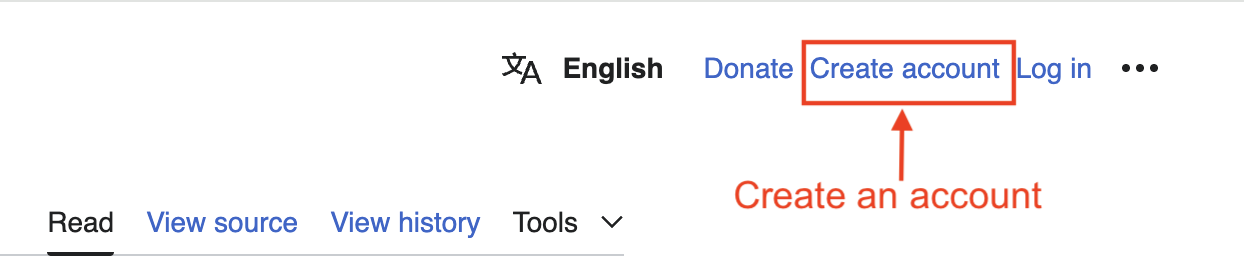
Figure 7. Account creation section on Wikidata.
Adding and Editing an Item
After logging in and before adding a new item, it is recommended that you search Wikidata to ensure the item does not already exist. To do this, simply type the name of the item into the Wikidata search bar and review the results. If you find a similar item, you can contribute to it instead of creating a new one. If the item does not exist, you can create a new one.
Click the Create a new item button in the top-right corner of the Wikidata homepage (Figure 8).
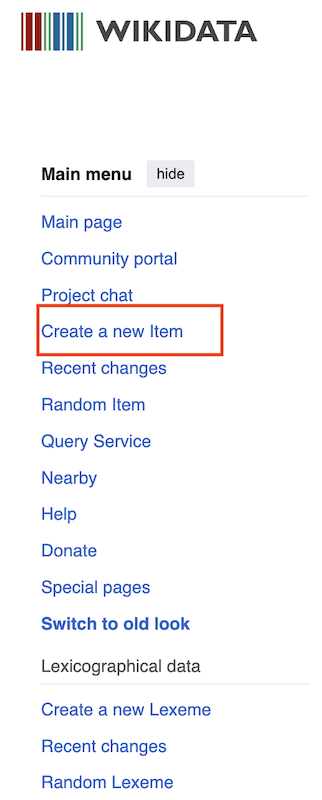
Figure 8. Creating a new item on Wikidata.
From there, you can begin filling out the fields by entering the required information for your new item. Typically, you will include at least a name and description for the new item (Figure 9). Keep in mind that there are several established conventions that help ensure consistency across the project:
-
Lowercase: Descriptions generally start with a lowercase letter unless the first word is a proper noun that requires capitalization.
-
Brevity and clarity: Descriptions should be short and clear, offering concise information about the item in a way that’s easy to understand. In most cases, the proper length is between two and twelve words.
-
Avoid redundancy: Do not repeat information already present in the item’s label. The description should add context and/or clarify the item.
-
No initial articles: Avoid starting descriptions with articles (such as ‘a’ or ‘an’) to maintain uniformity and simplicity.
-
No ending punctuation: Descriptions should not end with a period, as they are more like informative tags than full sentences.
-
Local language: Descriptions should be written in the local language of the Wikidata project. For example, if you’re contributing to the English version of Wikidata, the descriptions should be in English.
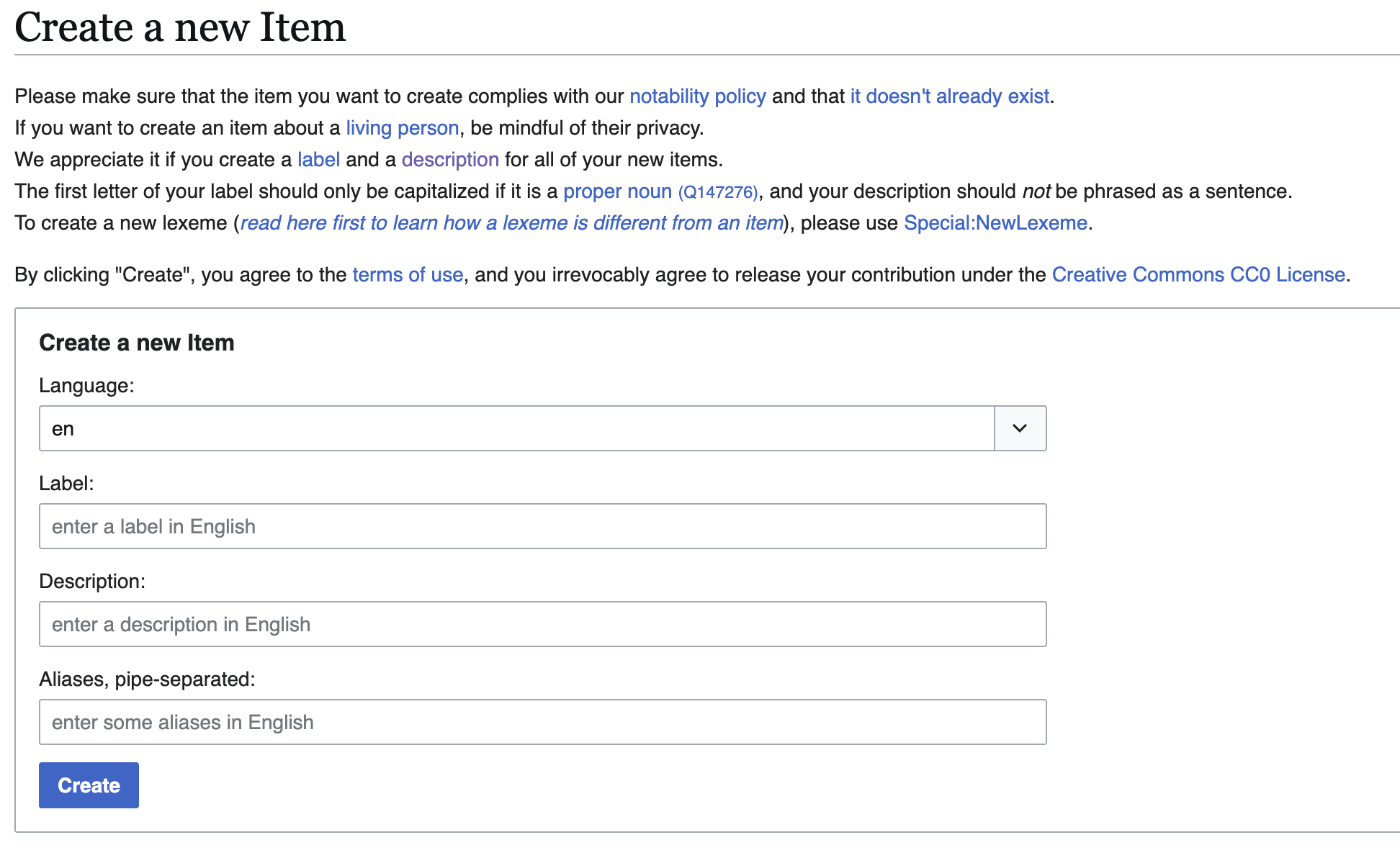
Figure 9. Filling out information for a new item on Wikidata.
Adding Statements to an Item
Next, it’s time to start adding statements to enrich the item’s information. Immediately after clicking Create, you’ll see a new screen with a list of statements related to Wikimedia projects. In the top-right corner, you’ll find an Add statement button marked with a plus sign. Clicking it will open a window where you can add properties and values for the new item.
In Wikidata, the first statement commonly added is the instance of property (P31), which indicates the type of entity the item represents. This statement helps classify and organize information within Wikidata. Due to the wide range of items in Wikidata, there are many possible values for the instance of property. Depending on what you’re creating, you’ll choose the entity type that best fits the nature of your object or concept.
For example, if you’re creating an item for a well-known person, you might use: instance of: ‘human’, while if you’re describing Paris, the first statement could be: instance of: ‘city’. This statement classifies the item and connects it to similar entries in the database.
Here are some examples of values commonly used with the instance of property:
-
‘human’: For an entity representing a specific person
-
‘city’: For an entity representing a city
-
‘work of art’: For paintings, sculptures, and other artistic works
-
‘book’: For items representing books or written publications
-
‘film’: For items representing movies
For a longer list of examples see Pages that link to Property:P31
Wikidata provides a dropdown menu with controlled vocabulary to help you select the most appropriate label for each instance. Although you can freely type into the field, suggestions from the controlled vocabulary appear quickly.
After adding the instance of statement, you can continue adding additional statements to further describe the item, using specific properties and associated values.
Describing Academic Journal Data in Wikidata
To understand how Wikidata can be used to describe entities related to academic research, let’s consider the case of the annual publication of the Sociedad de Bibliotecarios de Puerto Rico (Puerto Rican Society of Librarians), founded in 1998, titled ‘Acceso: Revista Puertorriqueña de Bibliotecología y Documentación’. Its unique identifier in Wikidata is Q116681177.
Statements in Wikidata consist of (at least) one property–value pair. Figure 10 shows the values that have been added for the first statement (instance of) for this item: academic journal, scientific journal, and open access publication.
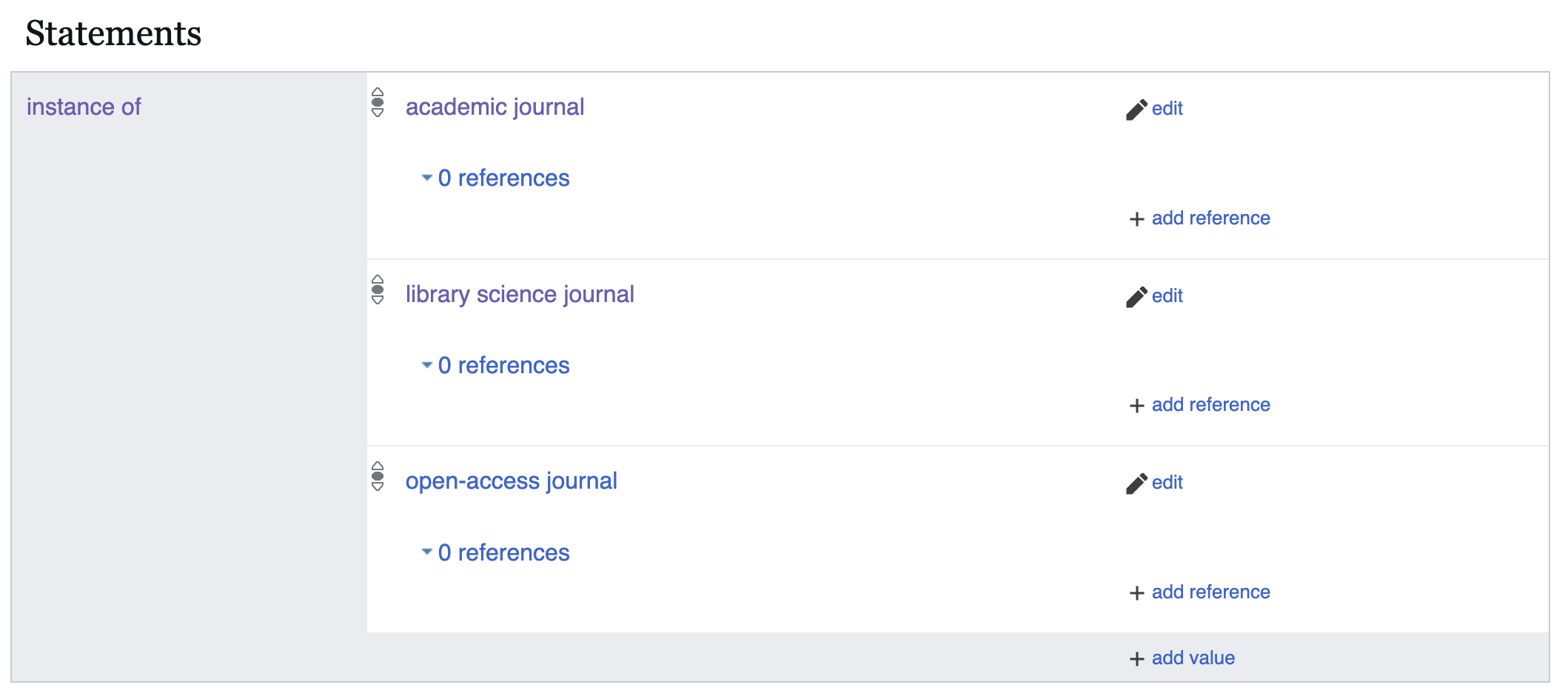
Figure 10. Example of the instance of statement for a journal.
There is no limit on the number of properties and values you can add to an item in Wikidata. It depends on the amount of information you wish to include about the scientific journal. You can add as many as necessary to fully describe the item you are representing. For example, other values that could also be included are ‘specialized journal’ or ‘society journal’. However, it’s important to consider the relevance and accuracy of the information you are contributing. The goal is not to add as much as possible, but rather to provide meaningful and useful data for users.
As shown in Figure 11, the next property added to this item is short name (P1813). In the case of journals, this is used to record abbreviated titles. Following the short name, the full official title has been added, along with its reference.
Whenever possible, it’s good practice to provide references to support the information you enter. This helps maintain the reliability and verifiability of Wikidata content. References can be links to trustworthy sources such as official websites, recognized databases, scholarly books and articles, or any other academic publication that supports the claim made in the statement.
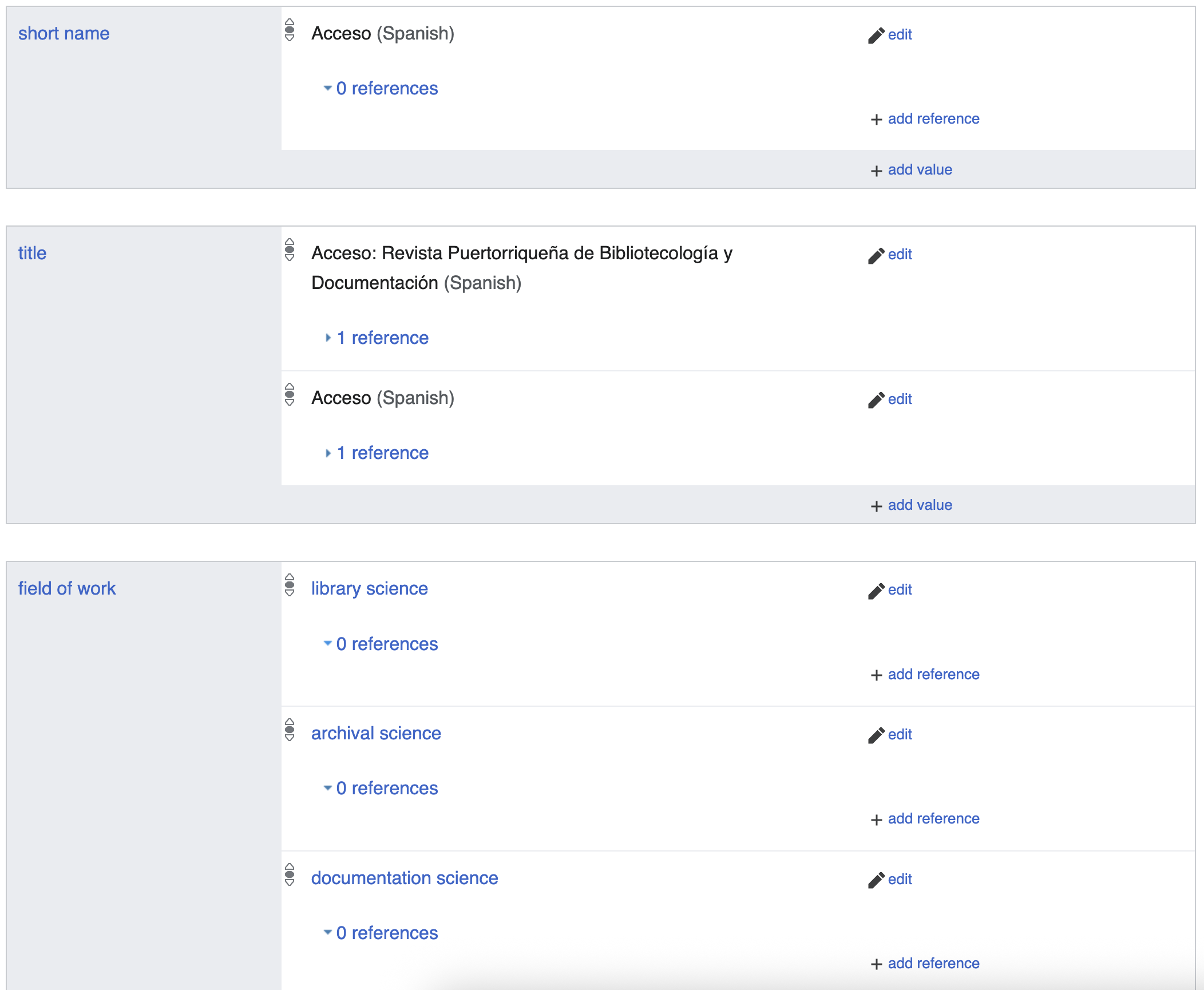
Figure 11. Example of journal metadata in Wikidata: title, short title, and field of work.
References in Wikidata typically follow a standard format that includes information such as the source title, author (if available), publication date, and a URL or unique identifier, such as a Digital Object Identifier (DOI) or an International Standard Book Number (ISBN), that allows users to access the original source.
The next property listed for this journal is field of work (P101), which refers to the journal’s area of specialization, its academic field or discipline. For the Acceso journal, several terms were added related to the management, organization, and preservation of information in different contexts: information science, archival science, documentation science, and museology. Many of these concepts are also repeated under the property main subject (P921).
Even when describing just the basic metadata for a journal, several additional properties may be relevant in Wikidata, such as:
-
country of origin (P495): Indicates the country from which the journal is published.
-
place of publication (P291): Indicates the city or country where the journal’s editorial office is based or where it is regularly published. This provides geographic context and helps users understand its reach and audience.
-
language of work (P407): Specifies the language in which the journal articles are published. This property helps users identify and filter works by language in Wikidata.
-
official website (P856): Records the URL for the journal’s official website. Providing this link gives users direct access to more information about the publication.
-
online access status (P6954): Indicates whether the journal is freely available online, requires a subscription, or is not available online.
-
publisher (P123): Identifies the organization or individual responsible for editing and managing the publication. In the case of Acceso, the value used is ‘Sociedad de Bibliotecarios de Puerto Rico’.
Figure 12 shows an example of how the property indexed in bibliographic review (P8875) is used in Wikidata. Through linked data, items can be connected to external databases and catalogs.
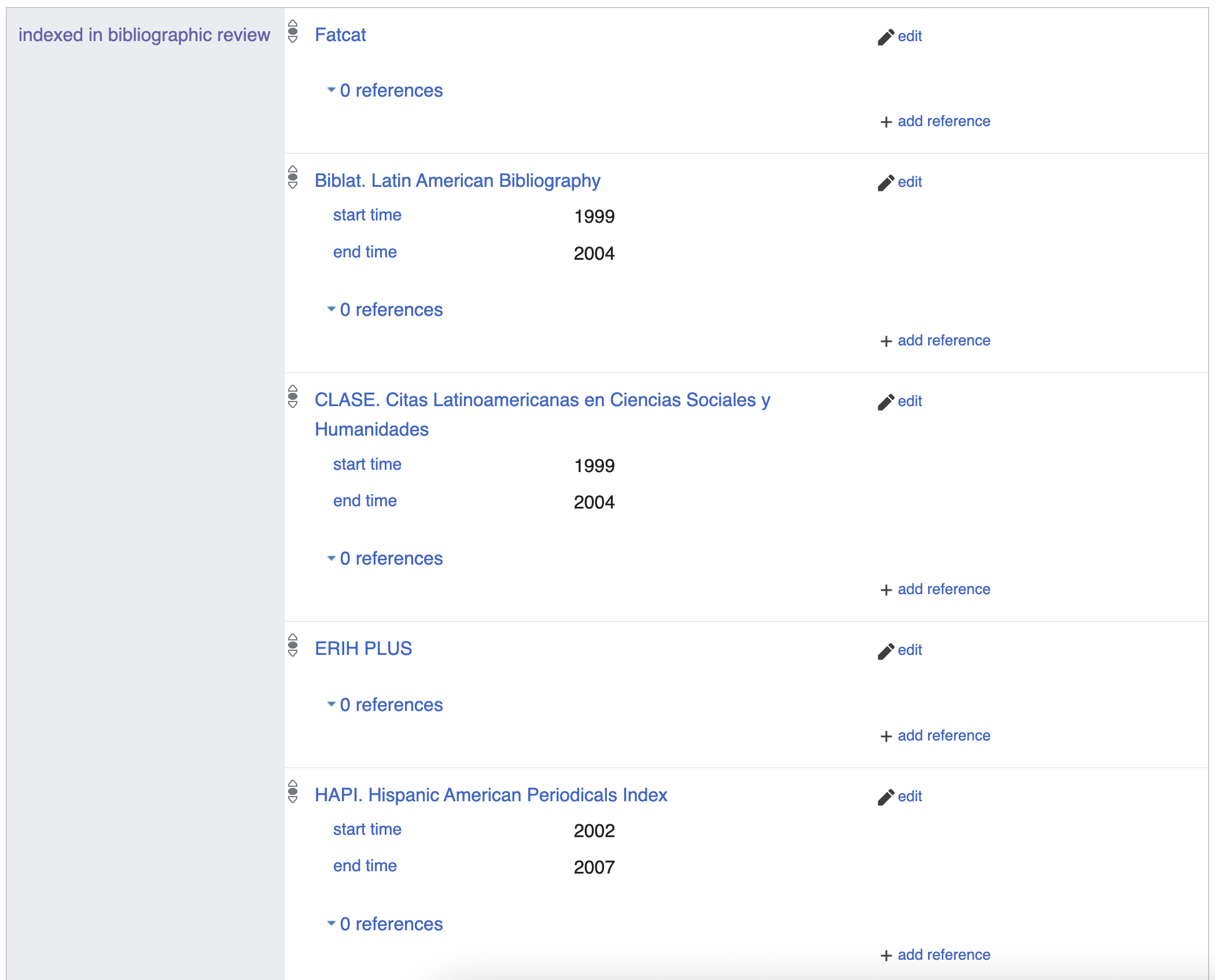
Figure 12. Example of using the indexed in bibliographic database property in Wikidata.
Describing People in Wikidata
Creating linked open data about individuals is an important step in describing entities within libraries, academia and research, as it enables authorship to be linked to the work (paper, book, etc.).12 In this way, Wikidata can help increase the visibility of an institution’s scholarly output.
Using Wikidata to create person records also supports identity management in libraries, archives, and museums. Identity management depends on the use and linking of unique identifiers from different sources. Including multiple identifiers for the same person in Wikidata facilitates exploration, discovery, and access to information beyond traditional metadata silos, such as library catalogs.
A common use of Wikidata person identifiers is entity linking (EL) for disambiguation. Named entity recognition (NER) is combined with Named Entity Linking (NEL) in libraries and archives platforms such as the Impresso Web App. The platform enables access to a collection of digitised newspapers. By linking person names to Wikidata, it allows users to find mentions of a person despite the various ways their names might be spelled, using the above-covered list of aliases. Moreover, it helps, for example, to disambiguate persons by linking a mention to ‘Kennedy’ in a newspaper to J. F. Kennedy (Q9696) former president of the United States instead of George Kennedy (Q298818), the actor.
When creating data about people, especially living individuals, it is important to consider ethical issues related to dignity, safety, and privacy. The Wikidata page Wikidata:Living people states that only verifiable information should be included, and that this information must not violate reasonable expectations of privacy. Statements about a person must be backed by reliable sources.
The first step in creating a person record in Wikidata is to make sure a record does not already exist. If none exists, you may create a new item. In the label field, enter the name by which the person is most commonly known. Then, write a brief description of the person, and optionally include other name variants. After completing the label and description, you can begin adding statements. The first statement should be instance of (P31) with the value ‘human’ (Q5). Figure 13 shows how this was done for Puerto Rican philosopher Francisco José Ramos (Q105725041).
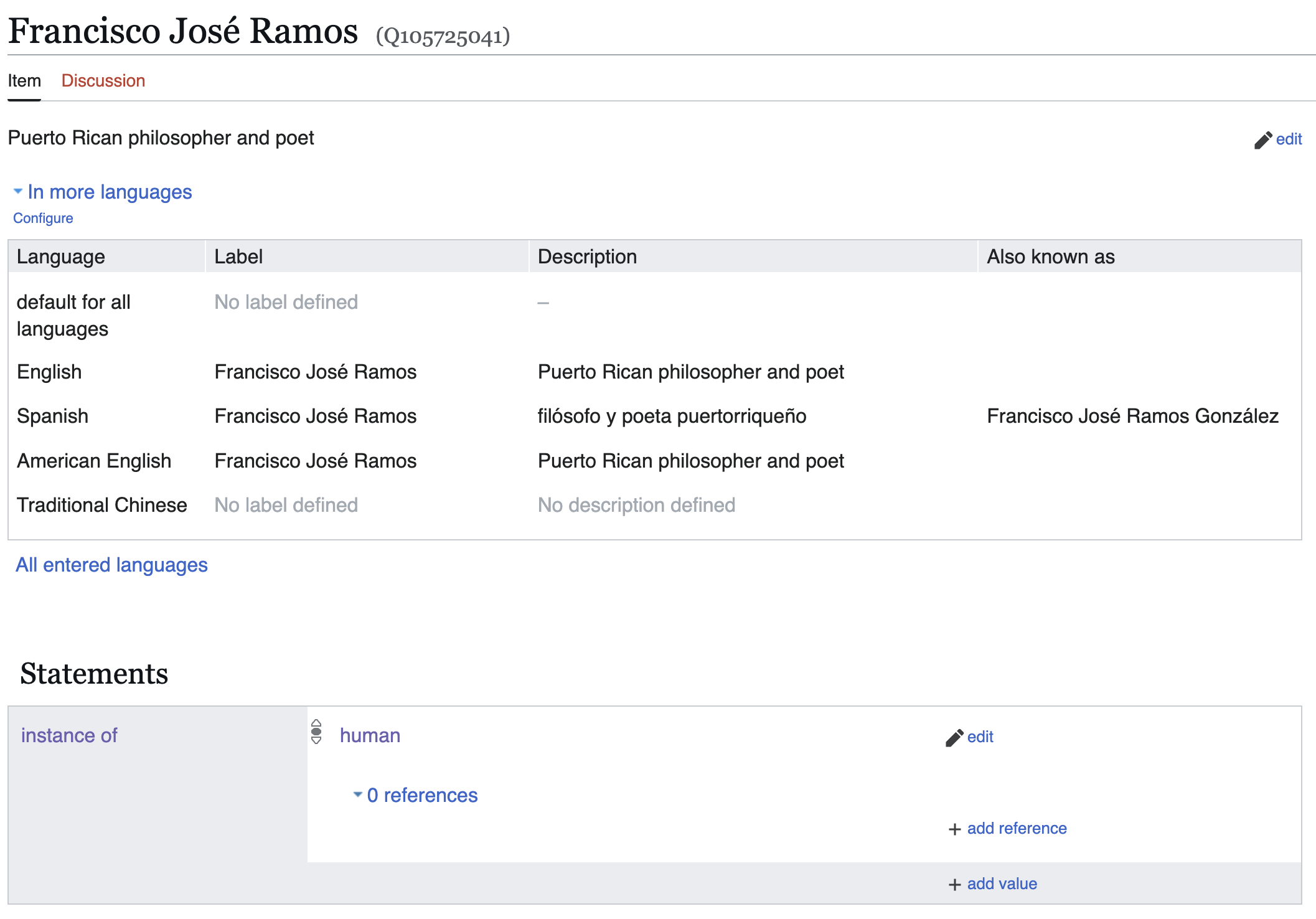
Figure 13. Label, description, and name variants in Wikidata.
The next statements relate to names. You can add given name (P735), family name (P734), and second family name (P1950). For compound given names, enter each name as a separate value under the given name property, and use the qualifier series ordinal (P1545) to indicate first and second given name. Figure 14 illustrates this process for entering the compound given name ‘Francisco José’.
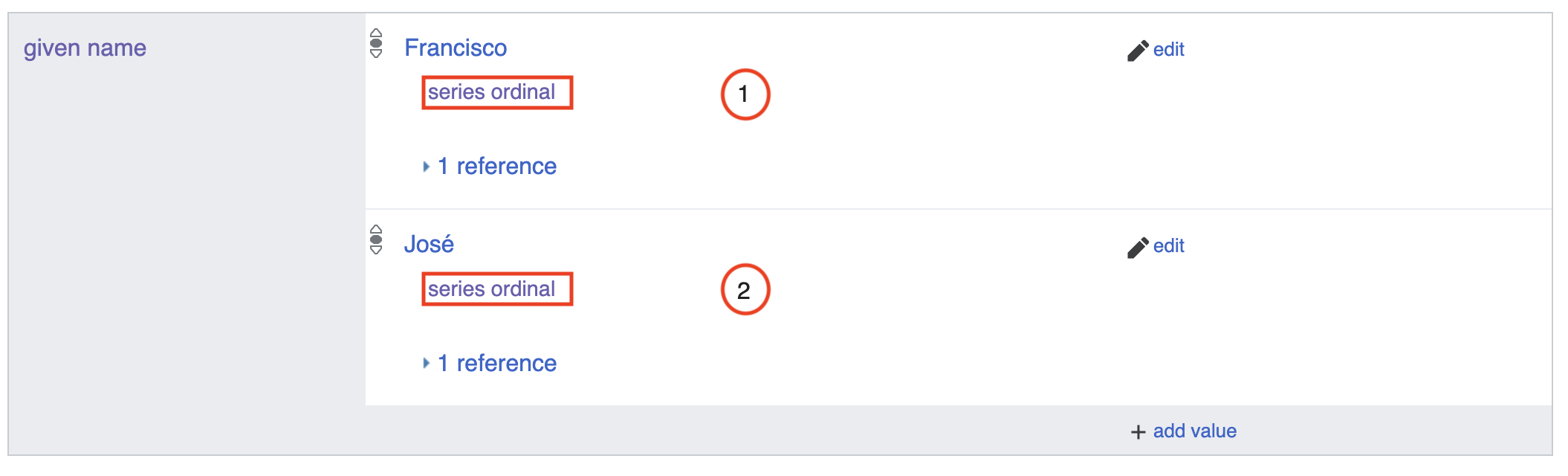
Figure 14. Compound given name in Wikidata.
For Hispanic surnames, two properties should be used. The family name (P734) is used for the paternal surname, while second family name (P1950) is used for the maternal surname.
Another common property when describing individuals is field of work (P101). This property indicates a person’s area of expertise or discipline. You may add as many values as needed to accurately reflect the fields of knowledge or activity in which the person is recognized.
You may also include the property occupation (P106), which complements the field of work. This property allows multiple values and is useful for representing the different professional or artistic roles of a person. Keep in mind that all personal information should come from trustworthy and accessible sources. These sources should be cited as references for each value entered. Figure 15 shows the values for the occupation property, with references from a Wikipedia article.
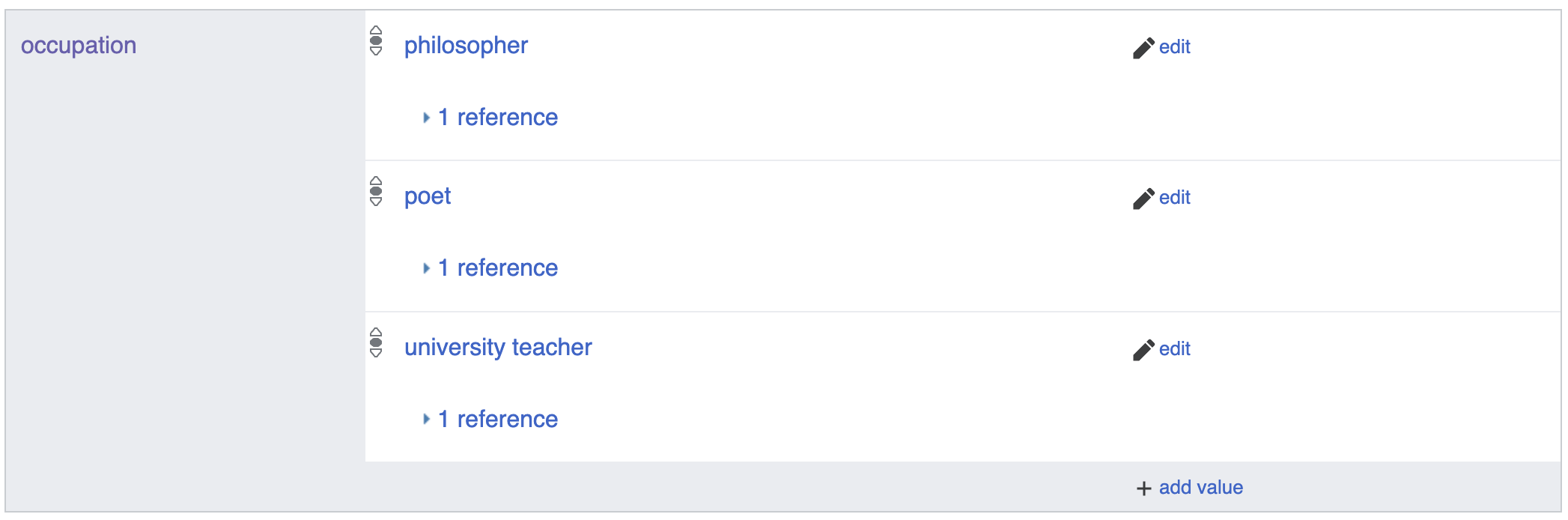
Figure 15. Values for the occupation property in Wikidata.
Recording identifiers associated with a person is one of the most important aspects of Wikidata. Each identifier is added as a distinct property. For example, you can include: ORCID iD (P496), Scopus Author ID (P1153), VIAF cluster ID (P214), ISNI (P213), Library identifiers such as the Library of Congress authority ID (P244) or the National Library of Spain ID (P950). Figure 16 shows a set of identifiers for the same person.
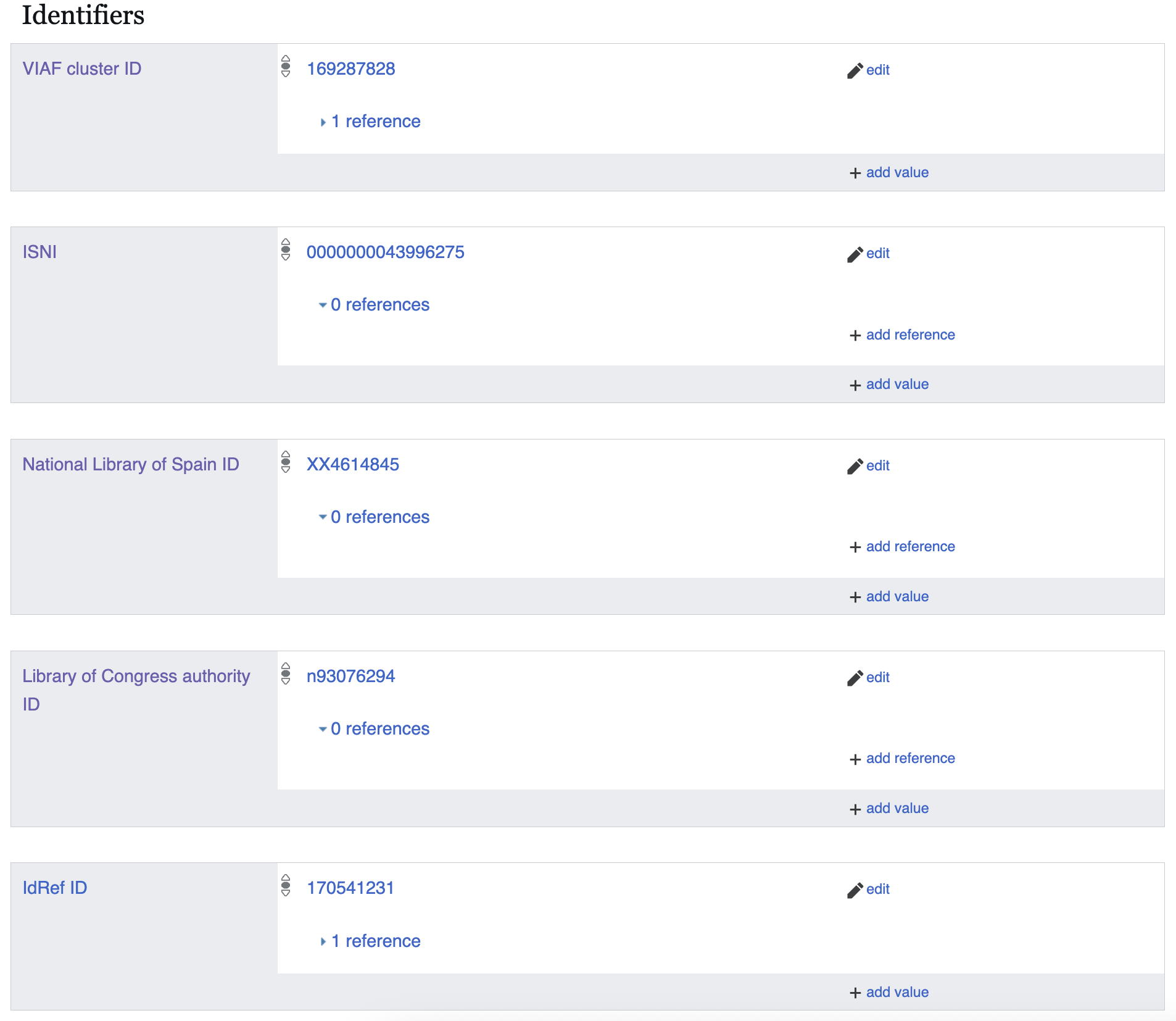
Figure 16. Identifiers associated with a person in Wikidata.
These are just some of the properties available for creating linked open data about individuals in Wikidata. Below are other relevant properties that can provide more detailed information. However, we must be cautious when entering data about living people and always consider ethical implications related to their dignity, safety, and privacy.
-
place of birth (P19): To specify the person’s known birthplace.
-
date of birth (P569): To specify the person’s date of birth.
-
country of citizenship (P27): To specify the person’s legal citizenship. Note that this is a legal term, not a cultural term, and does not necessarily reflect a person’s cultural or ethnic background.
-
languages spoken, written, or signed (P1412): To specify the languages the person uses.
-
affiliation (P1416): To indicate the organization to which a person is affiliated.
-
employer (P108): A subproperty of affiliation, used to specify the institution or company for which a person works.
-
educated at (P69): To indicate the academic institution(s) where the person studied.
-
sex or gender (P21): To indicate the sex or gender with which the person identifies. This property can be sensitive and potentially privacy-violating, so it should be used with care.
Tools Suggested for Item Description in Wikidata
Wikidata offers a variety of tools to make your work easier. These resources are available in the Preferences menu, under the Gadgets section (Figure 17).
Note the Preferences menu is only visible if you are logged into your user account. Click on the dropdown menu on the top right of the page to see the Preferences menu.
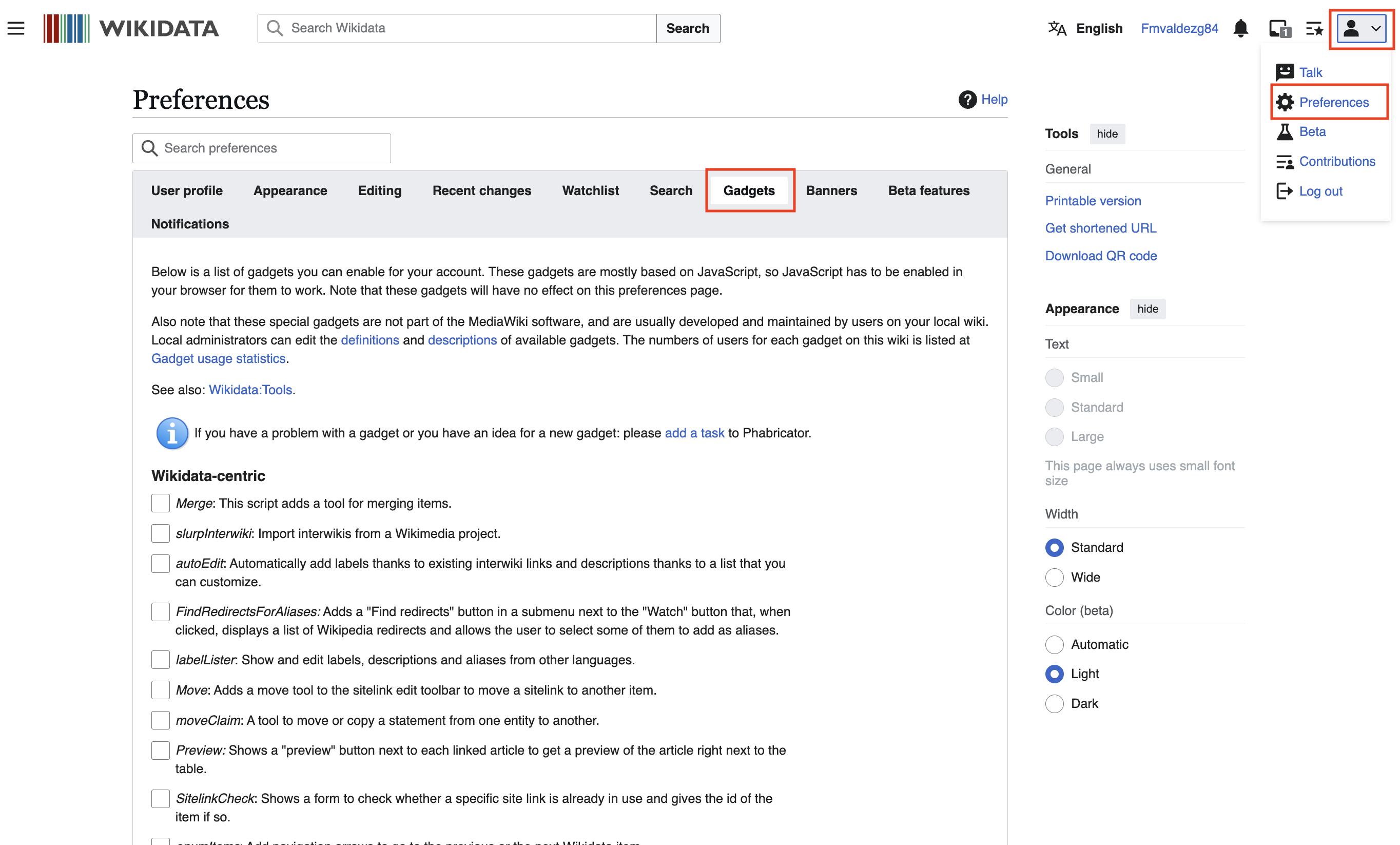
Figure 17. Wikidata Preferences menu.
One helpful tool for creating and editing entities is Recoin (Relative Completeness Indicator) (see Figure 18), which displays a list of relevant properties that can be added to an entity’s page. This is especially useful for new users who may not yet be familiar with Wikidata’s properties.

Figure 18. Recoin tool in Wikidata.
Once activated, the Recoin tool appears on the entity’s page. You can click on it to view a list of relevant properties you may want to include. Below is a list of the most important properties for describing a person (Figure 19).
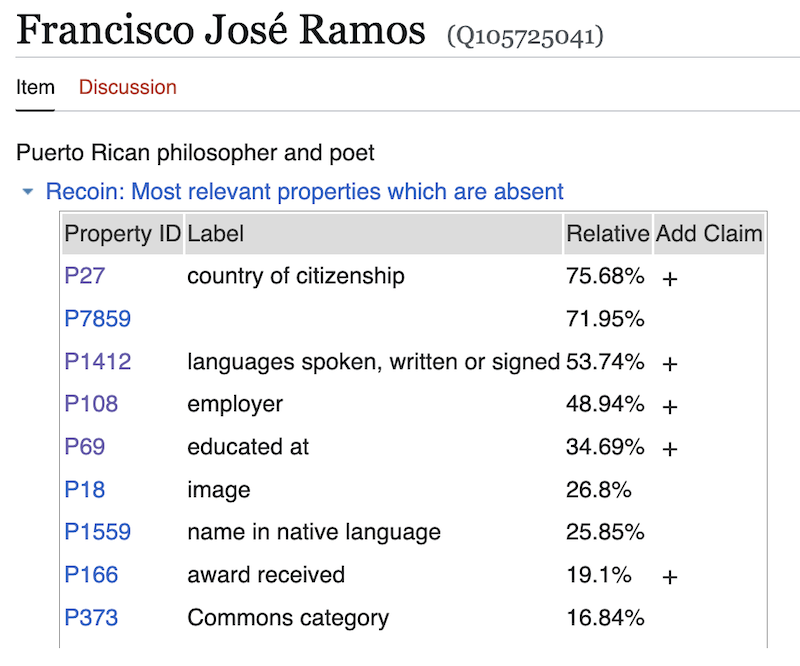
Figure 19. Relevant properties suggested by the Recoin tool in Wikidata.
For those looking to go further, learning SPARQL opens up powerful possibilities for querying and analyzing Wikidata at scale. Through Wikidata’s Query Service, you can write SPARQL queries to extract custom datasets, identify patterns, and explore relationships between items in ways that manual browsing cannot achieve. For a deeper dive into querying Wikidata programmatically, Wikidata’s SPARQL Query Service and its accompanying tutorial are excellent next steps.
Finally, the Wikidata Tools directory provides a comprehensive overview of community-built resources for editing, querying, and visualizing data.
Conclusions
In this lesson, we have overviewed the fundamentals of metadata and linked open data, which has illustrated the potential and importance of Wikidata for information management and retrieval. Throughout this tutorial, we explored the structure of Wikidata and the steps needed to create and edit two kinds of items: academic journals and the profiles of editors and authors who are linked to those journals.
Through this lesson, you learned how to structure and link this data to promote open access and contribute to the visibility and interoperability of resources in a digital environment. Even if you had never worked with Wikidata before, you now know how to get started. We encourage you to keep practicing and exploring further.
If you’re interested in learning more about linked open data and Wikidata, we recommend the Programming Historian lesson Introduction to the Principles of Linked Open Data by Jonathan Blaney (2017). We also recommend the guide Linked Open Data in Library Use Today by Gustavo Candela (2025), which gives a practical, accessible overview of Linked Open Data and why it matters for libraries.
Endnotes
-
Hyvönen, E. (2020, October). Digital humanities on the Semantic Web: Sampo model and portal series. In Digital Humanities in the Nordic Countries (pp. 373-378). CEUR. https://doi.org/10.3233/SW-223034 ↩
-
Daudinot Founier, Isabel. (2006). Organización y recuperación de información en Internet: teoría de los metadatos. ACIMED, 14(5) Recuperado el 27 de febrero de 2024, de http://eprints.rclis.org/9246/1/http___bvs.sld.cu_revistas_aci_vol14_5_06_aci06506.htm.pdf. ↩
-
Torres Pombert, Ania. (2006). ¿Catalogación en el entorno digital?: una breve aproximación a los metadatos. ACIMED, 14(5) Recuperado el 27 de febrero de 2024, de http://eprints.rclis.org/9251/1/http___bvs.sld.cu_revistas_aci_vol14_5_06_aci09506.htm.pdf. ↩
-
Cuba Rodríguez, Yariannis, & Olivera Batista, Dianelis. (2018). Los metadatos, la búsqueda y recuperación de información desde las Ciencias de la Información. E-Ciencias de la Información, 8(2), 146-158. https://dx.doi.org/10.15517/eci.v8i2.30085. ↩
-
Cadena López, Aydé, Ramos Luna, Lorena Litai, & Rivera González, Gibrán. (2022). Los datos abiertos en los estudios organizacionales: Reflexiones e implicaciones. Trace (México, DF), (82), 41-65. Epub 02 de diciembre de 2022. https://doi.org/10.22134/trace.82.2022.819. ↩
-
Ávila-Barrientos, Eder. (2022). Recuperación de información con Linked Open Data. Investigación bibliotecológica, 36(91), 125-146. Epub 15 de noviembre de 2022. https://doi.org/10.22201/iibi.24488321xe.2022.91.58567. ↩
-
Semantic triple https://en.wikipedia.org/wiki/Semantic_triple. ↩
-
Wikidata:SPARQL tutorial https://www.wikidata.org/wiki/Wikidata:SPARQL_tutorial. ↩
-
Data from Wikimedia page FindingGLAMs/GLAM statistics, archived in February 2020. ↩
-
Data from Wikimedia page FindingGLAMs/GLAM statistics, archived in February 2023. Current rankings can be found on https://meta.wikimedia.org/wiki/FindingGLAMs/GLAM_statistics. ↩
-
Obregón Sierra, Ángel. (2022). Inserción de metadatos de las bibliotecas españolas en Wikidata: un modelo de datos abiertos enlazados. Revista Española De Documentación Científica, 45(3), a330. https://doi.org/10.3989/redc.2022.3.1870. ↩
-
van der Werf, Titia. (2022). Author identity management in the book chain. Hanging Together: the OCLC Research Blog. Retrieved May 15, 2024, from https://hangingtogether.org/author-identity-management-in-the-book-chain/. ↩